

Right now you do every survey twice
Once on the boat. Then again at 11 p.m., rebuilding it from a notebook, forty voice memos and 200 photos. That's when the gap shows up: which battery, which locker, what the extinguisher tag said.
Notes in five places
Paper, phone memos, photos and memory. The report gets stitched together after you've left the boat
The gap turns up at the desk
You notice the missing service date while typing, hours after you could have read it off the tag
The same layout, typed again
Systems, findings, severity and recommendations, formatted by hand on every vessel
The client waits
Reports usually take three to seven working days. The buyer wanted an answer by Friday
Every sentence turns into a finding while you talk
Within seconds Axsail pulls out the component, where it is, what's wrong, the reading, what to do about it and a suggested severity.
Change your mind halfway? Say “under the galley sink, sorry, the starboard heads” and the finding moves with you.
Small talk stays out of the report
Chat with the broker about lunch or take a call from the yard. Only what you say about the vessel becomes a finding
Signal is optional
Your phone turns speech into text by itself. The findings catch up when it reconnects
Inspect the way the boat is laid out
Engine room first, then the deck, then back to the bilge. Axsail sorts it by system
Take photos as you go
Each one lands on the right finding
Recording carries on while you shoot. Axsail places each photo by what you say around it. Album photos go in too.
Wrong finding? Move it in two taps.


From the walk-round to the signed report
Press Start and talk through the yacht in your own words. Take photos as you go
Findings, readings, photos and system coverage fill in as you go
When a finding is missing a detail, your phone buzzes and you answer out loud
Confirm, edit or delete each finding. Severity changes only when you change it
Finalise it and send the PDF the same day
Check the draft from the saloon, halfway through the survey
Open the web app on a tablet and see the report taking shape: findings by severity, systems covered, questions still open. It updates every time you finish a sentence.

Findings updated 10:21:52 · read 47 utterances
The question reaches you while you're still at the spot
Axsail knows what each finding needs: a location, a recommendation and the readings your checklist asks for, like battery voltage or the extinguisher service date.
It gives you a minute to say it yourself. Then your phone buzzes with a one-line question. Answer out loud and it closes.
The checklist fills in as you talk
Walk the boat in the order that makes sense on the day. Each finding lands under the right system, and that system is marked inspected.
Saving the running gear for the haul-out? Say so, and the reason goes on record. Before you step off, one glance shows which systems you haven't mentioned yet.
A survey record that holds up when a client pushes back
Each system marked inspected, or skipped with the reason you gave
Each finding linked to the words you said on board, with the time you said them
Each photo on the finding it shows, with the time you took it
Each finalised issue kept exactly as you sent it. A change goes out as Issue 2, and Issue 1 stays on file

Review the findings on the pontoon
Findings are grouped by system. Confirm the right ones, fix a location or a recommendation, and delete what doesn't belong.
Added something about a finding you'd already confirmed? Axsail shows both versions and you pick one.
The report your client expects, the same day
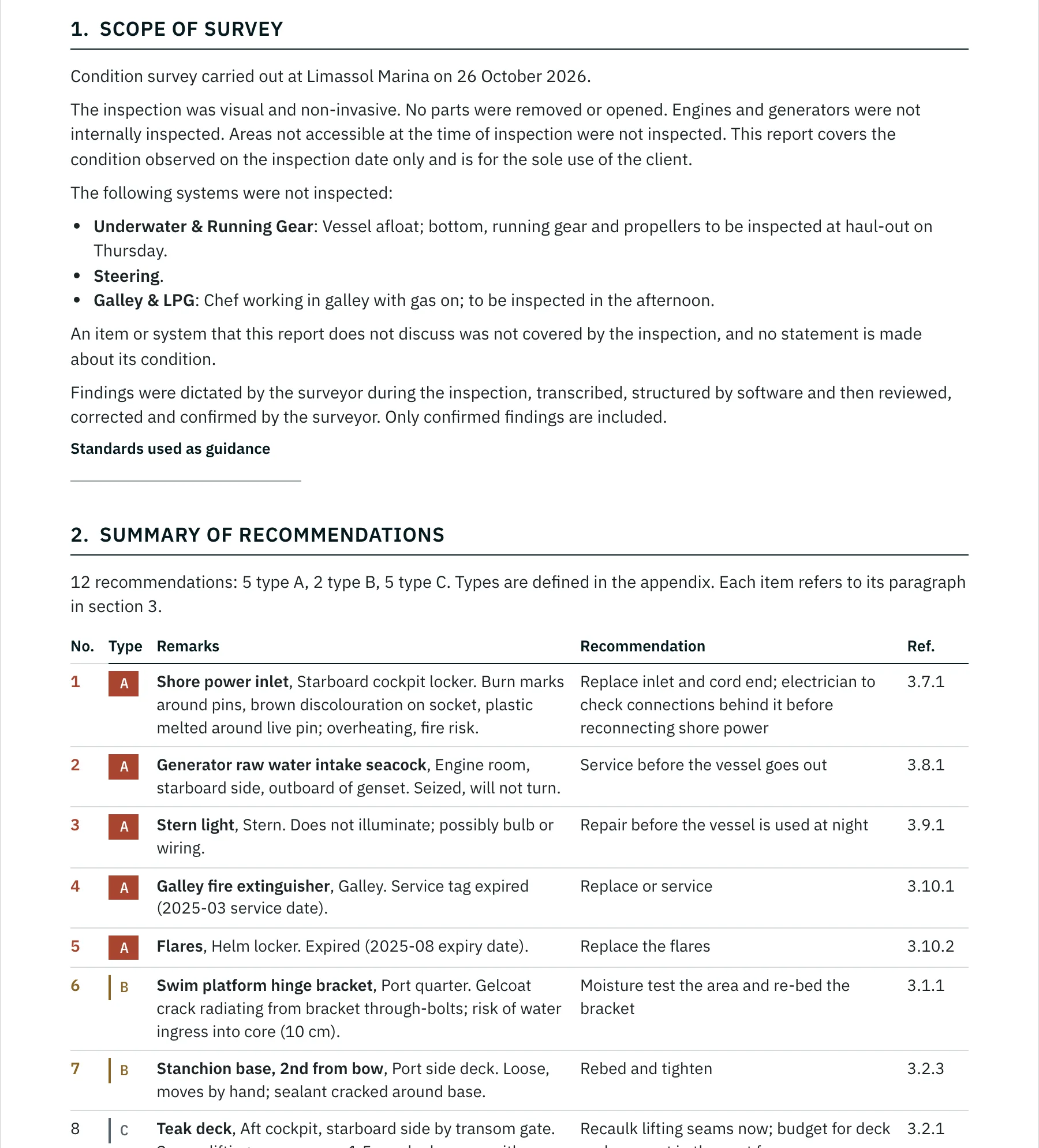
It follows the condition-survey layout your clients already read: vessel particulars, scope and limitations, a section for each system, and recommendations coded A, B and C, with the vessel photo on the cover and your photos beside each finding. You can edit every line. It carries your signature, so it goes out when you're happy with it.


Built for the people who walk the boat
Condition and pre-purchase surveys
Talk through the survey on board. You step off with a draft that only needs your review and signature
Learn moreFleet and base inspections
Your technicians record condition checks between charters and before the season, in one format across the fleet
Learn moreQuestions surveyors ask
What do I need on board?
An iPhone or Android phone with the Axsail app. You review and sign the report in the web app, on a laptop or tablet
Do I have to follow a script?
Talk the way you normally would. Axsail works out the system, component and location from context, including corrections and details you add later
What if the captain or the broker is talking next to me?
Axsail builds findings from what you say about the vessel. Small talk and phone calls stay out of the report. Keep the phone close to you so your voice comes through clearest
Where does the audio of my survey go?
It stays on your phone. The app turns your speech into text on the device, then discards the audio. Axsail receives only the text and its timestamps
Who decides the severity?
You do. Axsail suggests A, B or C for each finding, and it stays a suggestion until you confirm or change it
What if I forget something after I finish?
Press Continue and say it. Everything you've confirmed or edited stays as it was, and the new details land in your review
Can I add photos?
Take them in the Axsail app during the survey, or pick them from your album. Each one goes on the finding you describe
What if I need to change a report after I've sent it?
Amend it. The new version goes out as Issue 2, and Issue 1 stays on file exactly as the client received it
Can I edit the report before it goes to the client?
Yes. You can edit every finding, remark and system status in review before you sign
Leave the boat with the report written
Start free with 4 credits and no card. Run your next real survey through Axsail, from the first sentence to the signed PDF
Start free